✨ 목표
Angular와 Node.js(Express)를 활용해 간단한 CRUD API를 구현하고, 이를 Cafe24 서버에 배포하여 프론트엔드와 백엔드 API가 연동되는 전체 구조를 구축하는 과정을 다룹니다.
📦 주요 작업 요약
- Angular 프로젝트에서 HTTP 클라이언트로 Node.js API 연동
- Node.js(Express) 서버 구축 및 API 라우터 구현
- Angular 빌드 후 정적 파일을 Express에서 서비스하도록 구성
- FileZilla를 사용해 Cafe24 서버에 업로드
- MobaXterm에서 PM2 또는 Node 명령어로 서버 실행
- 외부 접속으로 프론트엔드-백엔드 연동 정상 작동 확인
✔️ 1. Angular 프로젝트 설정 및 API 연동
- VSCode에서 프로젝트 폴더(myPrj)를 열고, 해당 경로에 예제 코드에 맞춰 필요한 폴더 및 파일을 생성합니다.
1️⃣ Angular HTTP 클라이언트 설정
Angular는 HttpClientModule을 사용하여 외부 API와 통신합니다. 먼저, app.module.ts에 해당 모듈을 등록해야 합니다.
📄 src/app/app.module.ts
import { NgModule } from '@angular/core';
import { BrowserModule } from '@angular/platform-browser';

import { AppRoutingModule } from './app-routing.module';
import { AppComponent } from './app.component';
import { HttpClientModule } from '@angular/common/http';
import { UserListComponent } from './components/user-list/user-list.component';
import { FormsModule } from '@angular/forms';

@NgModule({
  declarations: [
    AppComponent,
    UserListComponent
  ],
  imports: [
    BrowserModule,
    AppRoutingModule,
    FormsModule,
    HttpClientModule  // ✅ API 호출을 위한 HttpClientModule 등록
  ],
  providers: [],
  bootstrap: [AppComponent]
})
export class AppModule { }
📄 src/app/app.component.html
<div>
  <h1>Angular + Node.js API 통신 예제</h1>
  <app-user-list></app-user-list>
</div>
2️⃣ 사용자 데이터 인터페이스 정의
API에서 사용하는 사용자 데이터를 타입스크립트 인터페이스로 정의합니다.
📄 src/app/models/user.ts
export interface User {
  id: number;
  name: string;
  email: string;
}
3️⃣ 사용자 API 서비스 작성
Node.js 서버와 통신하기 위한 API 서비스 파일을 생성합니다. HttpClient를 이용해 CRUD 기능을 구현합니다.
📄 src/app/services/user.service.ts
import { Injectable } from '@angular/core';
import { HttpClient } from '@angular/common/http';
import { Observable } from 'rxjs';
import { User } from '../models/user';

@Injectable({
  providedIn: 'root'
})
export class UserService {
  private apiUrl = 'http://localhost:3000/api/users';

  constructor(private http: HttpClient) { }

  // 모든 사용자 가져오기
  getUsers(): Observable<User[]> {
    return this.http.get<User[]>(this.apiUrl);
  }

  // 특정 사용자 가져오기
  getUser(id: number): Observable<User> {
    return this.http.get<User>(`${this.apiUrl}/${id}`);
  }

  // 새 사용자 추가
  addUser(user: Omit<User, 'id'>): Observable<User> {
    return this.http.post<User>(this.apiUrl, user);
  }

  // 사용자 정보 수정
  updateUser(id: number, user: Partial<User>): Observable<User> {
    return this.http.put<User>(`${this.apiUrl}/${id}`, user);
  }

  // 사용자 삭제
  deleteUser(id: number): Observable<User> {
    return this.http.delete<User>(`${this.apiUrl}/${id}`);
  }
}
4️⃣ 사용자 컴포넌트 생성 및 템플릿 작성
Angular 프로젝트에서 사용자 데이터를 CRUD 하는 UI를 처리할 컴포넌트를 생성합니다.
⭐️ 컴포넌트 생성 명령어:
C:\myPrj\client\src\app>
ng g c components/user-list
📄 src/app/components/user-list/user-list.component.ts
import { Component, OnInit } from '@angular/core';
import { User } from '../../models/user';
import { UserService } from '../../services/user.service';

@Component({
  selector: 'app-user-list',
  templateUrl: './user-list.component.html',
  styleUrls: ['./user-list.component.css']
})
export class UserListComponent implements OnInit {
  users: User[] = [];
  newUser = { name: '', email: '' };
  selectedUser: User | null = null;

  constructor(private userService: UserService) { }

  ngOnInit(): void {
    this.loadUsers();
  }

  loadUsers(): void {
    this.userService.getUsers()
      .subscribe(users => this.users = users);
  }

  addUser(): void {
    if (this.newUser.name && this.newUser.email) {
      this.userService.addUser(this.newUser)
        .subscribe(user => {
          this.users.push(user);
          this.newUser = { name: '', email: '' };
        });
    }
  }

  selectUser(user: User): void {
    this.selectedUser = { ...user };
  }

  updateUser(): void {
    if (this.selectedUser) {
      this.userService.updateUser(this.selectedUser.id, this.selectedUser)
        .subscribe(updatedUser => {
          const index = this.users.findIndex(u => u.id === updatedUser.id);
          if (index !== -1) {
            this.users[index] = updatedUser;
          }
          this.selectedUser = null;
        });
    }
  }

  deleteUser(id: number): void {
    this.userService.deleteUser(id)
      .subscribe(() => {
        this.users = this.users.filter(user => user.id !== id);
        if (this.selectedUser && this.selectedUser.id === id) {
          this.selectedUser = null;
        }
      });
  }

  cancelEdit(): void {
    this.selectedUser = null;
  }
}
📄 src/app/components/user-list/user-list.component.html
<div class="container">
  <h2>사용자 목록</h2>

  <!-- 사용자 추가 폼 -->
  <div class="add-form">
    <h3>새 사용자 추가</h3>
    <div>
      <input type="text" placeholder="이름" [(ngModel)]="newUser.name">
    </div>
    <div>
      <input type="email" placeholder="이메일" [(ngModel)]="newUser.email">
    </div>
    <button (click)="addUser()">추가</button>
  </div>

  <!-- 사용자 목록 -->
  <table>
    <thead>
      <tr>
        <th>ID</th>
        <th>이름</th>
        <th>이메일</th>
        <th>작업</th>
      </tr>
    </thead>
    <tbody>
      <tr *ngFor="let user of users">
        <td>{{ user.id }}</td>
        <td>{{ user.name }}</td>
        <td>{{ user.email }}</td>
        <td>
          <button (click)="selectUser(user)">수정</button>
          <button (click)="deleteUser(user.id)">삭제</button>
        </td>
      </tr>
    </tbody>
  </table>

  <!-- 사용자 수정 폼 -->
  <div *ngIf="selectedUser" class="edit-form">
    <h3>사용자 수정</h3>
    <div>
      <input type="text" placeholder="이름" [(ngModel)]="selectedUser.name">
    </div>
    <div>
      <input type="email" placeholder="이메일" [(ngModel)]="selectedUser.email">
    </div>
    <button (click)="updateUser()">저장</button>
    <button (click)="cancelEdit()">취소</button>
  </div>
</div>
📌 environments가 없다면, 추후에 작업을 위해 추가
environments 폴더를 생성하고, 개발 환경 및 프로덕션 환경 파일을 작성할 수 있습니다.
📄 src/environments/environment.ts:
export const environment = {
  production: false,
  apiUrl: 'http://localhost:3000/api'  // 개발용 API URL
};
📄 src/environments/environment.prod.ts:
export const environment = {
  production: true,
  apiUrl: 'https://your-production-api-url.com/api'  // 배포용 API URL
};
📁 최종 client 디렉터리 구조 예시:
client/
├── src/
│ ├── app/
│ │ ├── components/
│ │ │ └── user-list/
│ │ │ ├── user-list.component.ts
│ │ │ ├── user-list.component.html
│ │ │ └── user-list.component.css
│ │ ├── models/
│ │ │ └── user.ts
│ │ ├── services/
│ │ │ └── user.service.ts
│ │ ├── app.routing.module.ts
│ │ ├── app.component.css
│ │ ├── app.component.html
│ │ ├── app.component.spec.ts
│ │ ├── app.component.ts
│ │ └── app.module.ts
│ ├── assets/
│ ├── environments/
│ │ ├── environment.ts
│ │ └── environment.prod.ts
│ ├── index.html
│ ├── main.ts
│ └── styles.css
├── angular.json
├── package.json
└── node_modules/
✅ Angular 프론트엔드 실행 테스트 (ng serve)
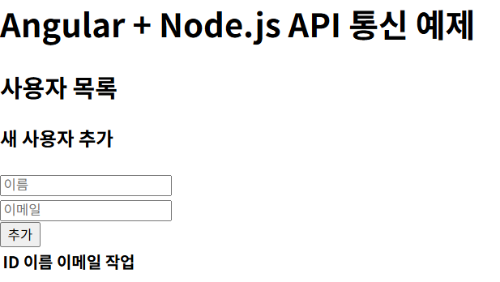
프론트엔드 코드 구조를 다 만들었다면, 로컬에서 정상적으로 화면이 뜨는지 먼저 확인해 보는 것이 좋습니다.
1. client 폴더를 통합 터미널에서 열기
C:\myPrj\client>
2. 필요한 패키지 설치
npm install
3. 개발 서버 실행
ng serve
4. 브라우저에서 확인
아래 주소로 접속하면 Angular 앱이 실행됩니다:
http://localhost:4200
- 아무 에러 없이, 만들어둔 컴포넌트 화면이 보이면 성공입니다.
- 만약 오류가 난다면 콘솔의 에러 메시지를 확인하고, 빠진 파일이나 오타가 없는지 다시 확인하세요.
✔️ 2. Node.js(Express) 서버 구성
- Node.js는 백엔드 API 서버로, Angular와 통신하며 사용자 데이터를 처리합니다. 여기서는 간단한 Express 기반 서버를 하나의 파일(server.js)로 구성합니다.
1️⃣ server.js 작성
📄 server.js
const express = require('express');
const cors = require('cors');
const bodyParser = require('body-parser');

const app = express();
const PORT = 3000;

// CORS 설정 (Angular 앱에서 API 호출 허용)
app.use(cors());

// JSON 요청 바디 파싱
app.use(bodyParser.json());

// 샘플 데이터
let users = [
  { id: 1, name: '홍길동', email: 'hong@example.com' },
  { id: 2, name: '김철수', email: 'kim@example.com' },
  { id: 3, name: '이영희', email: 'lee@example.com' }
];

// GET - 모든 사용자 조회
app.get('/api/users', (req, res) => {
  res.json(users);
});

// GET - 특정 사용자 조회
app.get('/api/users/:id', (req, res) => {
  const id = parseInt(req.params.id);
  const user = users.find(user => user.id === id);

  if (user) {
    res.json(user);
  } else {
    res.status(404).json({ message: '사용자를 찾을 수 없습니다.' });
  }
});

// POST - 사용자 추가
app.post('/api/users', (req, res) => {
  const newUser = {
    id: users.length > 0 ? Math.max(...users.map(user => user.id)) + 1 : 1,
    name: req.body.name,
    email: req.body.email
  };

  users.push(newUser);
  res.status(201).json(newUser);
});

// PUT - 사용자 정보 수정
app.put('/api/users/:id', (req, res) => {
  const id = parseInt(req.params.id);
  const index = users.findIndex(user => user.id === id);

  if (index !== -1) {
    users[index] = { ...users[index], ...req.body };
    res.json(users[index]);
  } else {
    res.status(404).json({ message: '사용자를 찾을 수 없습니다.' });
  }
});

// DELETE - 사용자 삭제
app.delete('/api/users/:id', (req, res) => {
  const id = parseInt(req.params.id);
  const index = users.findIndex(user => user.id === id);

  if (index !== -1) {
    const deletedUser = users[index];
    users = users.filter(user => user.id !== id);
    res.json(deletedUser);
  } else {
    res.status(404).json({ message: '사용자를 찾을 수 없습니다.' });
  }
});

// 서버 시작
app.listen(PORT, () => {
  console.log(`서버가 http://localhost:${PORT} 에서 실행 중입니다.`);
});
✅ Node.js(Express) 백엔드 서버 실행 테스트 (node server.js)
1. server 폴더를 통합 터미널에서 열기
C:\myPrj\server>
2. 한 번만 필요한 패키지 설치 (이미 설치했다면 생략 가능)
npm install express cors body-parser
3. 서버 실행
node server.js
4. 성공 메시지 확인
서버가 http://localhost:3000 에서 실행 중입니다.
5. 브라우저 테스트
http://localhost:3000/api/users
접속하면 JSON 형식의 사용자 목록이 출력됩니다.
💡 추가 팁
- 백엔드 배포 전에 server.js 내 포트 번호를 80으로 바꾸면 도메인만으로 접속 가능 (http://도메인/api/...)
✨ 여기까지 Angular 에서 Node.js API와 연동하는 기본 구조를 만들었습니다.
다음 글에서는 Express 기반의 Node.js API 서버를 구축하고, Cafe24 서버에 배포하여 연동까지.
'개발공부기록 > Cafe24 서버 호스팅' 카테고리의 다른 글
| [ Cafe24 서버 호스팅 ] #7: MariaDB 연동 (기본 DB 생성 및 연결 테스트) (0) | 2025.05.12 |
|---|---|
| [ Cafe24 서버 호스팅 ] #6: Express API 서버 Cafe24에 배포 및 연동 테스트 (0) | 2025.05.09 |
| [ Cafe24 서버 호스팅 ] #4: Angular 빌드 후 Node.js로 실서버 배포 (PM2 + FileZilla) (2) | 2025.04.30 |
| [ Cafe24 서버 호스팅 ] #3: Node.js + Angular 프로젝트 생성 및 개발서버 실행까지! (0) | 2025.04.29 |
| [ Cafe24 서버 호스팅 ] #2: Node.js + Angular 개발환경 준비하기 (설치 및 환경 설정) (1) | 2025.04.23 |