✨ 목표
Express로 만든 Node.js 서버에 HTTPS(SSL)를 적용하고, Let's Encrypt(무료 SSL 인증서)를 이용하여 자동 갱신까지 구성합니다.
운영 환경은 Cafe24 리눅스 가상서버(CentOS 7) 기준입니다.
📦 주요 작업 요약
- Certbot 설치 (Let’s Encrypt 클라이언트)
- SSL 인증서 발급 (도메인 필요)
- Node.js 서버에 HTTPS 적용
- 인증서 자동 갱신 설정
- PM2를 통한 HTTPS 서버 운영
✔️ 1. Certbot 설치 (CentOS 7)
sudo yum install epel-release -y
sudo yum install certbot -y- Let’s Encrypt 클라이언트인 certbot을 설치합니다.
✔️ 2. 인증서 발급 (도메인 필요)
- 도메인이 yourdomain.com이라고 가정하고 진행합니다.
- 도메인이 서버 IP에 잘 연결되어 있어야 하며, 80 포트가 열려 있어야 합니다.
sudo certbot certonly --standalone -d yourdomain.com
✅ 참고
If you really want to skip this, you can run the client with
--register-unsafely-without-email but you will then be unable to receive notice
about impending expiration or revocation of your certificates or problems with
your Certbot installation that will lead to failure to renew.

Enter email address (used for urgent renewal and security notices)
 (Enter 'c' to cancel): [이메일 주소]

- - - - - - - - - - - - - - - - - - - - - - - - - - - - - - - - - - - - - - - -
Please read the Terms of Service at
https://letsencrypt.org/documents/LE-SA-v1.2-November-15-2017.pdf. You must
agree in order to register with the ACME server. Do you agree?
- - - - - - - - - - - - - - - - - - - - - - - - - - - - - - - - - - - - - - - -
(Y)es/(N)o: Y

- - - - - - - - - - - - - - - - - - - - - - - - - - - - - - - - - - - - - - - -
Would you be willing, once your first certificate is successfully issued, to
share your email address with the Electronic Frontier Foundation, a founding
partner of the Let's Encrypt project and the non-profit organization that
develops Certbot? We'd like to send you email about our work encrypting the web,
EFF news, campaigns, and ways to support digital freedom.
- - - - - - - - - - - - - - - - - - - - - - - - - - - - - - - - - - - - - - - -
(Y)es/(N)o: Y
Account registered.
Please enter the domain name(s) you would like on your certificate (comma and/or
space separated) (Enter 'c' to cancel): [도메인]
Requesting a certificate for [도메인]

Successfully received certificate.
Certificate is saved at: /etc/letsencrypt/live/[도메인]/fullchain.pem
Key is saved at:         /etc/letsencrypt/live/[도메인]/privkey.pem
This certificate expires on 2022-02-11.
These files will be updated when the certificate renews.
Certbot has set up a scheduled task to automatically renew this certificate in the background.

- - - - - - - - - - - - - - - - - - - - - - - - - - - - - - - - - - - - - - - -
If you like Certbot, please consider supporting our work by:
 * Donating to ISRG / Let's Encrypt:   https://letsencrypt.org/donate
 * Donating to EFF:                    https://eff.org/donate-le
- - - - - - - - - - - - - - - - - - - - - - - - - - - - - - - - - - - - - - - -
➡ 성공 시 인증서는 다음 경로에 저장됩니다:
/etc/letsencrypt/live/yourdomain.com/
├── cert.pem         # 서버 인증서
├── privkey.pem      # 개인 키
├── chain.pem        # 중간 인증서
└── fullchain.pem    # cert + chain 합본
✔️ 3. Node.js Express 서버에 HTTPS 적용
- server.js 에서 아래 코드를 추가 및 수정합니다
var fs = require('fs');
const https = require('https');
let options = {};
if (process.env.NODE_ENV === 'production') {
// SSL 인증서 키
options = {
ca: fs.readFileSync('/etc/letsencrypt/live/yourdomain.com/fullchain.pem'),
key: fs.readFileSync('/etc/letsencrypt/live/yourdomain.com/privkey.pem'),
cert: fs.readFileSync('/etc/letsencrypt/live/yourdomain.com/cert.pem'),
};
}
if (process.env.NODE_ENV === 'production') {
// server
console.log("port :: ", )
https.createServer(options, app).listen(443, () => {
console.log(`Node.js : 443 포트에서 서버가 가동되었습니다!`);
});
} else {
// server
app.listen(PORT, () => {
console.log(`Node.js : ${PORT} 포트에서 서버가 가동되었습니다!`);
});
}- .env에 아래 코드를 추가합니다. [로컬(VSCode)에서는 주석]
NODE_ENV=production
- server.js 파일을 수정하여 HTTPS를 적용합니다.
const mysql = require('mysql2');
const express = require('express');
const cors = require('cors');
const bodyParser = require('body-parser');
const path = require('path');
require('dotenv').config();
var fs = require('fs');
const https = require('https');
const app = express();
const PORT = process.env.DB_PORT || 3000;
// DB 연결 설정
const connection = mysql.createConnection({
host: process.env.DB_HOST,
user: process.env.DB_USER,
password: process.env.DB_PASSWORD,
database: process.env.DB_NAME
});
// CORS 설정 (Angular 앱에서 API 호출 허용)
app.use(cors());
// JSON 요청 바디 파싱
app.use(bodyParser.json());
// 정적 파일 제공 설정
app.use(express.static(path.join(__dirname, '_dist')));
// DB 연결 시도
connection.connect((err) => {
if (err) {
console.error('DB 연결 실패:', err);
return;
}
console.log('MySQL 데이터베이스에 연결되었습니다.');
});
let options = {};
if (process.env.NODE_ENV === 'production') {
    // SSL 인증서 키
    options = {
      ca: fs.readFileSync('/etc/letsencrypt/live/yourdomain.com/fullchain.pem'),
      key: fs.readFileSync('/etc/letsencrypt/live/yourdomain.com/privkey.pem'),
      cert: fs.readFileSync('/etc/letsencrypt/live/yourdomain.com/cert.pem'),
    };
}

if (process.env.NODE_ENV === 'production') {
  // server
  console.log("port :: ", )
  https.createServer(options, app).listen(443, () => {
      console.log(`Node.js : 443 포트에서 서버가 가동되었습니다!`);
  });
} else {
  // server
  app.listen(PORT, () => {
      console.log(`Node.js : ${PORT} 포트에서 서버가 가동되었습니다!`);
  });
}
📌 주의
- server.js는 루트(root) 권한이 아니면 /etc/letsencrypt 폴더 접근이 불가할 수 있습니다.
- Node.js를 루트로 실행하거나, 인증서를 별도 디렉터리로 복사해 권한을 부여하세요.
✔️ 4. 인증서 자동 갱신 (크론탭 설정)
✅ crontab 설치
# cron 설치
sudo apt update -y
sudo apt install -y cron

# cron 시작
sudo service cron start

# cron systemctl 활성화
sudo systemctl enable cron.service

# cron systemctl 등록 확인
sudo systemctl list-unit-files | grep cron
sudo service cron status
✅ Certbot + PM2 자동 갱신 설정 정리 (crontab 등록용)
1️⃣ crontab 열기
sudo crontab -e
2️⃣ crontab 설정
- ⭐️ 예시 1) 2개월마다 1일 00시에 인증서 갱신 + 서버 재시작
0 0 1 */2 * /usr/bin/certbot renew --renew-hook="sudo pm2 restart app"
✔️ 의미
- 2개월마다 (즉, 1월, 3월, 5월 등) 1일 00시 00분에 certbot을 실행
- 인증서가 갱신될 경우에만 sudo pm2 restart app 실행됨
✔️ 핵심
- "--renew-hook"은 인증서가 실제 갱신된 경우에만 후속 명령어가 실행
- 인증서 만료일이 30일 이상 남았다면 아무 일도 안 하고 조용히 넘어감
- ⭐️ 예시 2) 매일 새벽 3시에 인증서 갱신 + 서버 재시작
0 3 * * * certbot renew --post-hook "pm2 restart server.js"
✔️ 의미
- 매일 새벽 3시, 인증서 갱신 시도
- certbot renew가 성공/실패 여부와 무관하게, 실행 후 항상 pm2 restart server.js 실행
✔️ 핵심
- "--post-hook"은 갱신 여부와 상관없이 certbot이 실행된 후 항상 실행됨
- 인증서가 갱신되지 않아도, 매일 서버를 재시작하게 되는 단점이 있음
💡 추천 설정
- 예시 1번 (--renew-hook)을 사용하는 것이 더 효율적
- 너무 자주 서버 재시작하지 않고, 인증서 만료 임박 시에만 처리
🔍 crontab 설정 확인/로그 보기
✅ 잘 등록되었는지 목록 확인
sudo crontab -l

✅ crontab 실행 로그 확인
view /var/log/syslog
## crontab -l: 등록 확인
## --dry-run: certbot 정상 작동 테스트
## syslog: 실제 crontab 실행 여부 확인
✔️ 5. PM2로 HTTPS 서버 운영
pm2 start server.js
pm2 save
pm2 startup
✔️ 6. 접속 확인
브라우저에서 다음 주소로 접속합니다:
https://yourdomain.com
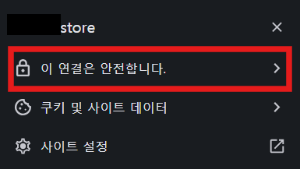
🔐 브라우저 자물쇠 아이콘이 보이면 HTTPS 적용 완료입니다 🎉
💡 추가 팁
- SSL 인증서 만료 알림을 방지하기 위해 이메일 알림을 설정하는 것이 좋습니다.
- Cloudflare 등을 사용하는 경우, SSL 설정이 중첩되지 않도록 주의하세요.
📌 참고사이트
https://www.vericras.com/development/letsencrypt-https-socket
Node.js Express SSL(Let's Encrypt) 세팅
Node.js Express SSL - Let's Encrypt
www.vericras.com
'개발공부기록 > Cafe24 서버 호스팅' 카테고리의 다른 글
| [ Cafe24 서버 호스팅 ] #9: 도메인 구매 및 연동하기 (Cafe24) (0) | 2025.05.12 |
|---|---|
| [ Cafe24 서버 호스팅 ] #8: 환경변수(.env) 관리 및 코드 정리 (0) | 2025.05.12 |
| [ Cafe24 서버 호스팅 ] #7: MariaDB 연동 (기본 DB 생성 및 연결 테스트) (0) | 2025.05.12 |
| [ Cafe24 서버 호스팅 ] #6: Express API 서버 Cafe24에 배포 및 연동 테스트 (0) | 2025.05.09 |
| [ Cafe24 서버 호스팅 ] #5: Angular - Node.js 기본 API 연동 & CRUD 예제 소스 (0) | 2025.05.08 |